
Product releases
Explore the latest updates from Row Zero.
Upcoming features
Folders
We’re adding support for folders to organize workbooks.
Google Slides integration
We’re adding the ability to insert refreshable Row Zero charts into Google Slides.
Aggregations and filters for data sources
We’re adding drop-down filters for any column in a data source, allowing users to filter beyond predefined query variables. Users will also be able to aggregate data by selecting a column and choosing functions like sum or average.
05.29.2026
05.28.2026
Show pivot details
You can now drill into pivot table values to see the underlying data that contributed to the value. Right click the cell you would like to drill into and select “Show Details for …”. Row Zero will automatically generate a new sheet containing each row of data that contributed to that pivot table value. Drill down makes it easy to transition from a high-level summary to specific rows of data.
05.27.2026
Pivot table aliases
You can now add aliases for pivot table row and column labels. To add an alias, click on the cell and type the alias. To clear aliases, right click and select “Reset pivot labels”.
05.22.2026
400+ spreadsheet functions
Row Zero now supports 400+ built-in functions, including all major Excel functions and several unique to Row Zero (e.g. MULTILOOKUP).
We’ve added 150 new functions so far in 2026, with a recent focus on:
- Supporting all remaining statistics functions: LINEST, SLOPE, INTERCEPT, CORREL, FORECAST, PROB, STANDARDIZE, RANK.AVG, PEARSON, RSQ, etc.
- Array manipulation methods: TAKE, DROP, CHOOSECOLS, CHOOSEROWS, EXPAND, TOCOL, TOROW, WRAPCOLS, WRAPROWS, TRIMRANGE, etc.
05.13.2026
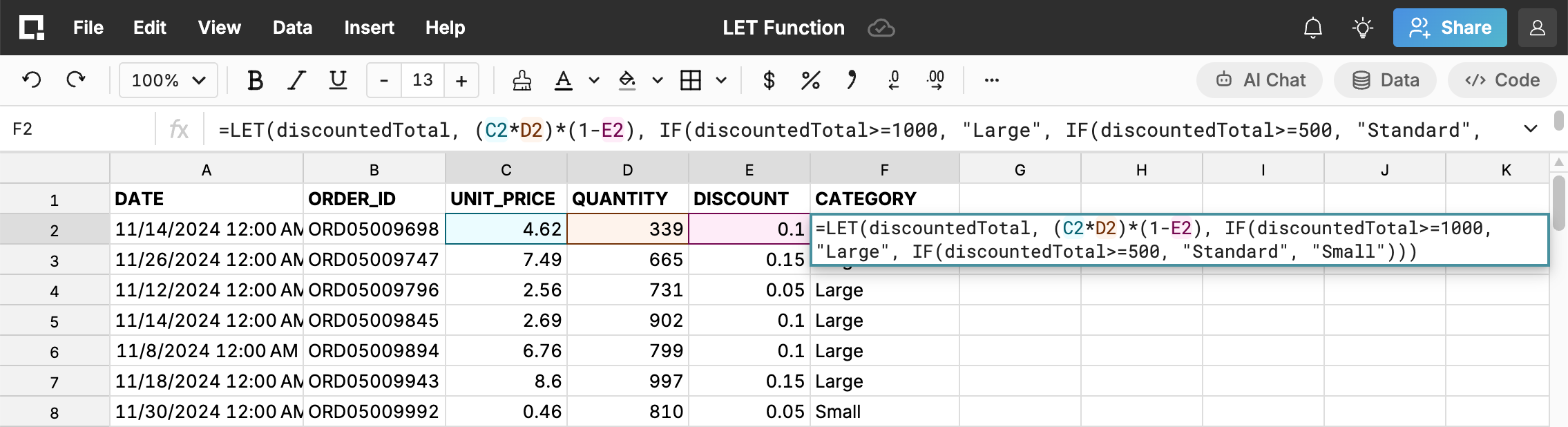
LET function
We added the LET function, which assigns names to values or expressions inside a formula.LET takes one or more name/value pairs followed by a final calculation that uses those names. This is helpful when a formula references the same complex expression multiple times — instead of repeating it, you define it once and reference it by name. Formulas become shorter and easier to read.
05.07.2026
Workbook localization
We’ve added support for international dates, currencies, and number formats. Set your workbook locale by going to File > Settings > Locale and selecting your locale.
Workbook locale impacts formulas, numbers, and dates as well as the dropdown formatting options.
05.04.2026
Multi-file upload
You can now import multiple CSV files at a time. Simply select multiple files during import and the files will combine into one sheet.
04.24.2026
Sort by color
You can now sort by color in filtered ranges and data tables.
Sorting by color is useful for workflows where you want to pull color-coded rows to the top for review and is particularly powerful when combined with conditional formatting that automatically color-codes your data.
04.18.2026
Controls to expand/collapse pivot fields
We’ve added new controls for expanding and collapsing pivot table fields. Right-click to expand/collapse by group, field, or the whole pivot.
03.31.2026
Cross-workbook references
We’ve added the IMPORTRANGE function to support referencing data across multiple workbooks.
The function takes two arguments (source workbook URL and source range) and returns the corresponding data. You must have access to copy the source workbook in order to import data. Data is automatically kept in sync when the source data changes.
Get started with Row Zero